

Introduction to cube:its
cube:its is a framework that brings ETSI-compliant V2X communication into the ROS 2 ecosystem. It is built on Vanetza and integrated with cube:radio and cube:ubx, exposing the cube:evk as an ITS station via ROS 2.
ROS 2
ROS 2 (Robot Operating System 2) is a framework for building modular software systems. At its core, ROS 2 uses a publish-subscribe messaging pattern combined with service-based request-response communication:
Topics (Publish-Subscribe)
- Nodes are independent processes that perform specific tasks
- Topics are named channels where nodes exchange messages
- Publishers send messages to a topic
- Subscribers receive messages from a topic
Example: A camera node publishes images to /camera/image, while a perception node subscribes to receive them.
Services (Request-Response)
- Services enable synchronous communication between nodes
- A client sends a request and waits for a response
- A server processes the request and returns a result
Example: A navigation node calls the /plan_path service with start and goal positions, and receives a computed path as response.
Topics vs Services:
- Use topics for continuous data streams (sensor data, status updates)
- Use services for one-time operations (triggering actions, requesting information)
ROS 2 handles networking, serialization, and discovery automatically. That is enough background to get started with cube:its.
For more detail, see the official ROS 2 documentation.
Docker
Docker is a containerization platform that packages applications with all their dependencies into isolated, portable units called containers.
A container behaves like a lightweight virtual machine:
- Self-contained. Includes the libraries, tools, and runtime the application needs.
- Isolated. Runs independently of the host system.
- Portable. Works the same on any machine with Docker installed.
cube:its runs as a Docker container on the cube:evk. This means:
- Dependencies are pre-configured
- Updates are pulled as a new image
- Multiple versions can coexist
- The host system stays unmodified
Interact with the container using standard Docker commands like docker run, docker exec, and docker logs. No host-side installation is required.
If you are new to Docker, see the official Docker documentation.
Architecture Overview
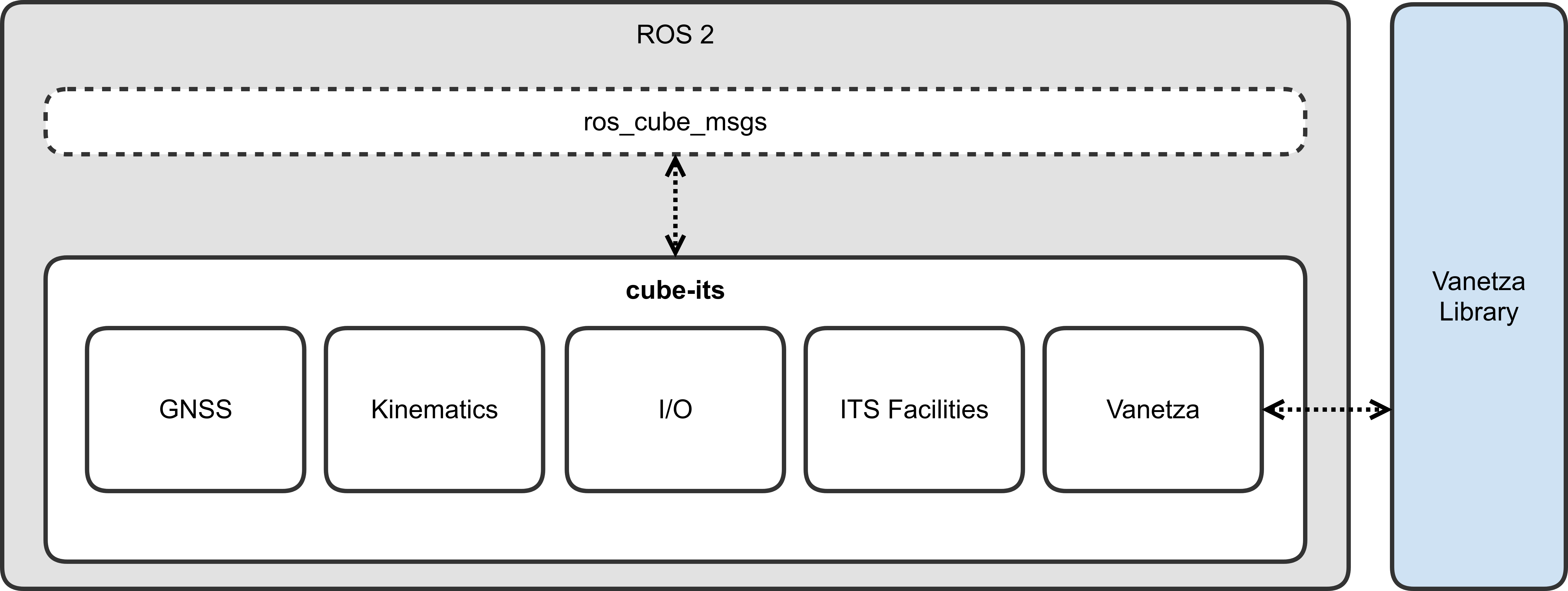
The cube:its framework comprises multiple ROS 2 nodes that collaboratively handle GNSS data, vehicle kinematics, I/O operations, ITS facilities, and V2X communication:
Core Components
| Component | Description |
|---|---|
| GNSS Node | Provides accurate positioning data from the on-board u-blox receiver via cube:ubx |
| Kinematics Node | Computes vehicle pose, velocity, and acceleration from GNSS and sensor data |
| I/O Node | Handles sensor inputs and actuator outputs (e.g., CAN interface) |
| ITS Facilities | Implements CAM, DENM, CPM, VAM generation and reception services |
| Vanetza Bridge | Connects to Vanetza for ETSI-compliant protocol handling |
ROS 2 Interface
cube:its exposes a clean ROS 2 API through the ros_cube_msgs package:
| Package | Description |
|---|---|
cube_ca_msgs | Cooperative Awareness (CAM) interface |
cube_den_msgs | Decentralized Environmental Notification (DENM) interface |
cube_cp_msgs | Collective Perception (CPM) interface |
cube_va_msgs | Vulnerable Road User Awareness (VAM) interface |
cube_facility_msgs | ITS facilities services and configuration |
cube_msgs | General cube settings and parameters |
Compatible ETSI Messages
cube:its incorporates the etsi_its_messages package for standardized V2X message definitions:
| Message | Specification | Status |
|---|---|---|
| CAM | EN 302 637-2 V1.4.1 | ✅ Supported |
| DENM | EN 302 637-3 V1.3.1 | ✅ Supported |
| CPM | TS 103 324 V2.1.1 | ✅ Supported |
| VAM | TS 103 300-3 V2.2.1 | ✅ Supported |
| MAPEM | TS 103 301 V2.1.1 | 🔜 Coming soon |
| SPATEM | TS 103 301 V2.1.1 | 🔜 Coming soon |
Supported Applications
cube:its includes pre-profiled applications specified by C-ITS platforms and consortia:
| Application | Specification | Status |
|---|---|---|
| StVeWa (Stationary Vehicle Warning) | C2C-CC RS 2006 R1.6.7 | ✅ Supported |
More applications are continuously being added. Custom application profiling is always possible by configuring message parameters and trigger conditions.
Node Discovery
ROS 2 provides flexible discovery mechanisms to control how nodes find and communicate with each other. By default, nodes discover each other on the same subnet using multicast.
Basic Configuration
To enable your ROS 2 nodes to discover and communicate with cube:its, ensure they share the same domain:
export ROS_DOMAIN_ID=42 # Default domain for cube:itsDiscovery Configuration
For finer control over node discovery, ROS 2 provides additional configuration parameters:
ROS_AUTOMATIC_DISCOVERY_RANGE
Controls how far ROS 2 nodes will try to discover each other:
| Value | Behavior |
|---|---|
SUBNET | Default. Discovers any node reachable via multicast (DDS-based middleware) |
LOCALHOST | Only discovers nodes on the same machine |
OFF | Disables discovery completely, even on the same machine |
SYSTEM_DEFAULT | Uses middleware defaults without modification |
Example:
export ROS_AUTOMATIC_DISCOVERY_RANGE=SUBNETROS_STATIC_PEERS
A semicolon-separated list of IP addresses where ROS 2 should look for nodes. Useful for connecting to specific machines when discovery range is limited.
Example:
export ROS_STATIC_PEERS="192.168.1.100;192.168.1.101"This allows connecting to nodes on those specific machines, as long as their discovery range isn't set to OFF.
Conformance Validation
cube:its is validated using the ETSI conformance framework specified in ETSI TR 103 099 V1.5.1, ensuring compliance with ETSI ITS standards.
cube.ini: Core Configuration for cube:its
cube:its is configured through a simple INI file located at:
/etc/cube/cube.iniThis file defines which ITS features are enabled, how the device identifies itself as a station, and optional vehicle parameters used by CAM, DENM, CPM, and VAM facility layers.
Below is the default structure of the configuration file:
[features]; enable CAN bus nodescan_bus = False; enable curvature calculationcurvature = False; enable built-in CAM providercam_provider = True
[cube]; running cube-its remotely; address = 192.168.178.119
[its]station_type = cyclist
[vehicle]; vehicle dimensions in meterlength = 1.9width = 1.1[features]: Enable or Disable Subsystems
This section controls optional cube:its modules.
| Key | Description | Default |
|---|---|---|
can_bus | Enables CAN-bus nodes. | False |
curvature | Enables calculation of road curvature based on motion data. | False |
cam_provider | Activates the built-in CAM provider that automatically publishes CAMs without requiring your own node. | True |
You can safely disable features you do not need to reduce computation load.
[cube]: Remote Operation
cube:its can run on your workstation using ROS 2 Dev Containers while the V2X radio and GNSS remain on the cube device.
To enable this, uncomment and set:
[cube]address = <cube-ip>Example:
address = 192.168.8.101This tells cube:its running on your host to connect to the cube’s local services (GNSS, radio, clock sync).
[its]: Station Type Configuration
The station type defines how your device identifies itself in V2X messages like CAM, CPM, and VAM. This value influences data fields and behavior in the facility layer.
[its]station_type = cyclistSupported station types:
unknownpedestriancyclistmopedmotorcyclepassenger_carbuslight truckheavy trucktrailerspecial_vehicle/special_vehiclestramroad side unit
This should match your actual deployment. For VRU or micro-mobility demonstrations, use:
station_type = cyclistFor vehicle prototypes:
station_type = passenger_carFor RSUs:
station_type = road_side_unit[vehicle]: Vehicle Dimensions (Used in CAM, CPM, VAM)
When operating as a vehicle station, providing realistic dimensions is essential for accurate safety messages.
Example:
[vehicle]length = 4.5width = 2.0These values affect:
- The CAM High Frequency Container
- CPM object relative positioning
- VAM safety envelopes for VRUs mounted on vehicles
Starting cube:its
The cube:evk includes a start-its command to launch the cube:its Docker container with the correct configuration. The script handles the Docker parameters and ROS 2 environment setup.
Basic Usage
Run:
cube:~$ start-itsThis starts cube:its with default settings: jazzy distribution and SUBNET discovery range.
Common Options
Choose ROS 2 Distribution
cube:~$ start-its --distro humblecube:~$ start-its --distro jazzy # DefaultAvailable distributions: humble, jazzy, kilted
Control Discovery Scope
Local only (nodes only discover on the same machine):
cube:~$ start-its --localNetwork-wide (nodes discover across your subnet):
cube:~$ start-its --remoteIf neither --local nor --remote is specified, the container uses ROS 2 defaults.
Set Domain ID
cube:~$ start-its --domain-id 42Default domain ID is 42 for cube:its.
Run as Daemon
Start cube:its in the background:
cube:~$ start-its --daemonWithout --daemon, the container runs interactively and you can see log output directly.
Advanced Usage
Custom Environment Variables
Pass additional environment variables to the container:
cube:~$ start-its -e ROS_STATIC_PEERS="192.168.1.100;192.168.1.101"cube:~$ start-its -e MY_CUSTOM_VAR=value -e ANOTHER_VAR=123Verbose Mode
See the exact Docker command being executed:
cube:~$ start-its --verboseStarting ITS with: docker run --rm --network host --ipc host -v /etc/cube:/etc/cube -it -e ROS_DOMAIN_ID=42 ghcr.io/cubesys-gmbh/cube-its:jazzyUseful for debugging or for inspecting the resulting Docker invocation.
Custom Image
Override the default image using environment variables:
cube:~$ START_ITS_IMAGE=my-registry/custom-its START_ITS_TAG=v1.0 start-itsComplete Examples
Start for local development:
cube:~$ start-its --local --distro jazzyStart for network access with custom domain:
cube:~$ start-its --remote --domain-id 100Start as daemon with static peers:
cube:~$ start-its --daemon --remote -e ROS_STATIC_PEERS="192.168.8.100"Verbose startup with multiple options:
cube:~$ start-its --verbose --distro humble --domain-id 50 -e MY_VAR=testUnder the Hood
The start-its script:
- Mounts the cube configuration for persistence
- Uses host networking for ROS 2
- Handles distribution-specific settings (for example, file descriptor limits for Humble)
- Maps discovery flags to the correct environment variables for each distribution
See ITS Facilities to write your own applications.